Text messages
Program name: Scout. Operated by Paul Thorsen.
Scout sends two kinds of texts, and neither is required to create an account. Scout does not send marketing texts. Notifications inside the app are push notifications.
Sign-in codes
On Sign In you can continue with Apple or Google, or tap Email or Phone. Phone is optional, and nothing is pre-checked. Tap Phone. The next screen is titled Continue with phone. Under the title it says “We’ll text you a code.” Enter your own mobile number. Above Continue the app shows:
By tapping Continue, you agree to receive a one-time sign-in code from Scout by text. Message frequency varies. Msg & data rates may apply. Reply HELP for help, STOP to opt out. Terms · Privacy
Tap Continue and one code is sent. Resend code waits 60 seconds, then sends another code to the same number. Tap Use a different number to return to the phone field. Reply STOP to cancel that code and sign-in codes stop until you reply START. Reply HELP for help, or email scoutsocialapp@gmail.com.
Texts about a game
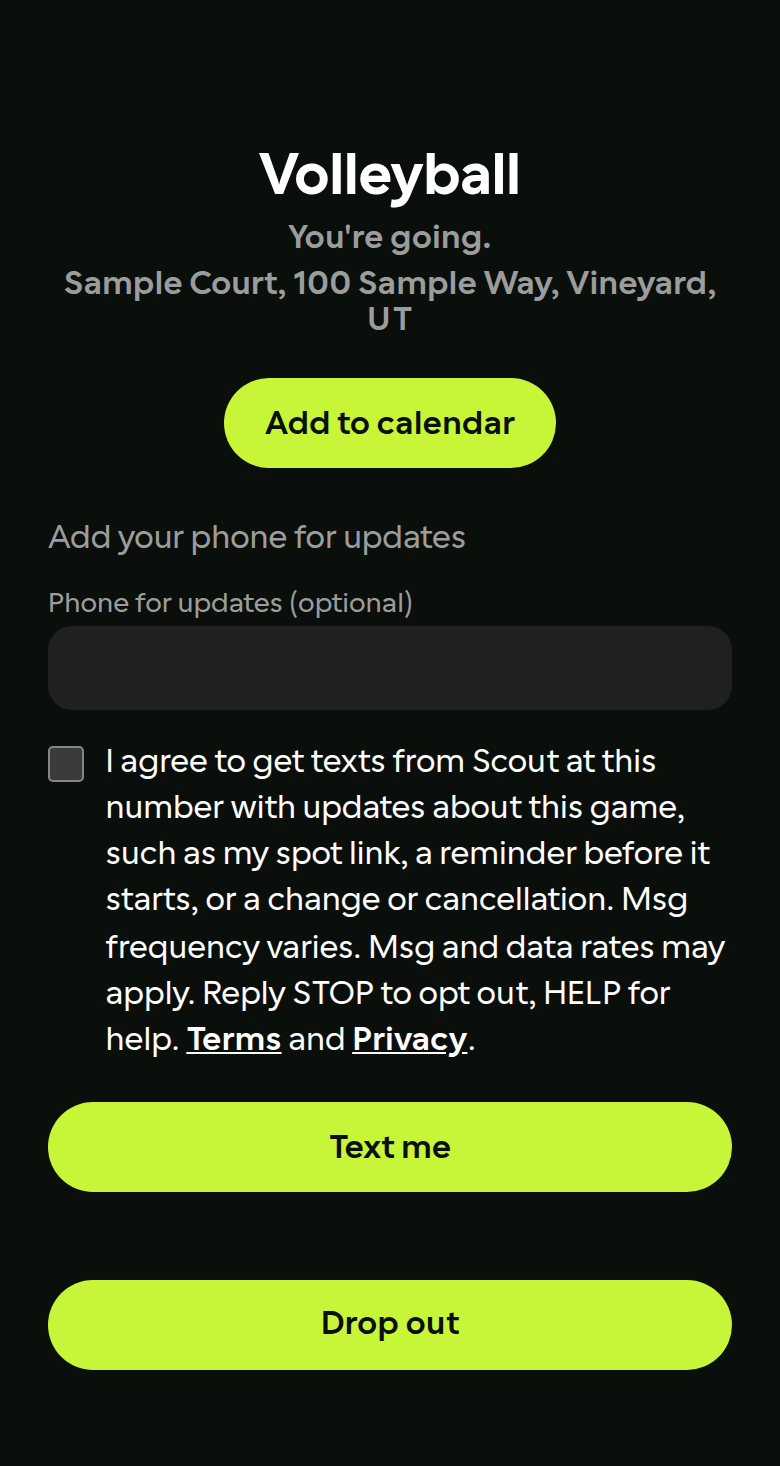
If you join a game from a link, you may add a phone number. The agreement starts unchecked. The words beside it are:
I agree to get texts from Scout at this number with updates about this game, such as my spot link, a reminder before it starts, or a change or cancellation. Msg frequency varies. Msg and data rates may apply. Reply STOP to opt out, HELP for help. Terms and Privacy.
Message frequency varies. Message and data rates may apply. Carriers are not liable for delayed or undelivered messages.